
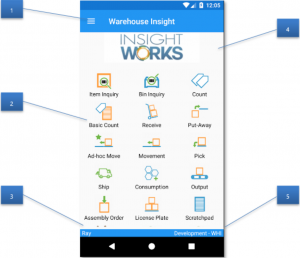
The initial interface below is broken into several applications. When selected, each application launches the appropriate module (covered in detail in subsequent sections).
| Callout ID | Description |
|---|---|
| 1 | The main landing page menu options. |
| 2 | The applications available for execution. |
| 3 | The currently logged in username (if applicable). |
| 4 | The Device Logo (if applicable). This can be changed via the Device Configuration card in Business Central. |
| 5 | The company name or location code. |
Landing Page Menu Options
The landing page menu options consist of the following:
- Reload Config
- Configure
- Sign Out
- Show Log
- About
Unlike other applications within Warehouse Insight, these menu options cannot be changed.
Reload Config (Menu)
Use the Reload Config option to update any cached settings (e.g., Device Configuration changes, Application changes, and menu changes).
Configure (Menu)
Use Configure to make configuration changes specific to the software installation. See Software Configuration for more details.
Sign Out
The Sign Out menu logs the current user out and opens the login page.
Show Log (Menu)
Show Log is used to view any log statements generated.
About (Menu)
About displays information concerning network connectivity and application versioning.
Still need help?
Ask other Business Central users in the Insight Works community, or send the details to the support team. Include the steps you took and any error message you saw.