

Barcode Simulator PowerTool for Windows
Free Windows App
Simulate barcode scans without a scanner
Simulate barcode scans in any Windows app for testing, training and demos, with no scanner needed.
Barcode Simulator PowerTool is a free Windows app from Insight Works that simulates barcode scans in any Windows app you choose. Developers, trainers and support teams use it for testing, training and demos, with no handheld scanner or printed barcodes.
Coming soon to the Microsoft Store.
- Windows
- Microsoft Store
- For testing, training and demos
How Barcode Simulator PowerTool helps
Scanning without a scanner
Send a scan to any Windows app
Testing, training or a demo usually means a handheld scanner and a sheet of printed barcodes. That slows down every retest and makes a demo on a laptop awkward.
Set the target window keyword to a word in the title of the window that should receive scans. Then double-click a saved barcode, or select it and choose Send. The value arrives just as a scan would.
See all Barcode Simulator PowerTool features ↓Repeatable tests
Use the same barcodes every time
Retests, training sessions and support cases need the exact same scans. Retyping values or hunting for the right printed label takes time and invites mistakes.
Save the barcodes you test with most, each with a category, description and format. Export a test set to a CSV file and import it on another computer, so a colleague runs the same scans.
See all Barcode Simulator PowerTool features ↓For Insight Works apps
Works with Warehouse Insight, Shop Floor Insight and Dynamic Ship
Testing scan-driven apps in Business Central usually means a device in hand for every scan.
If you use Insight Works apps, send scans to Warehouse Insight, Shop Floor Insight or Dynamic Ship in Business Central. Set the target window keyword to the app you are testing.
See all Barcode Simulator PowerTool features ↓Tuned for scan handling
Match the scan the app expects
A simulated scan has to reach the app the way a real scan does. The wrong characters or timing can mean a value that never registers.
Set prefix and suffix characters around the barcode value, or leave both empty to send the value only. Add a delay after the target window is focused, and an optional delay between keystrokes.
See all Barcode Simulator PowerTool features ↓Barcode Simulator PowerTool screenshots
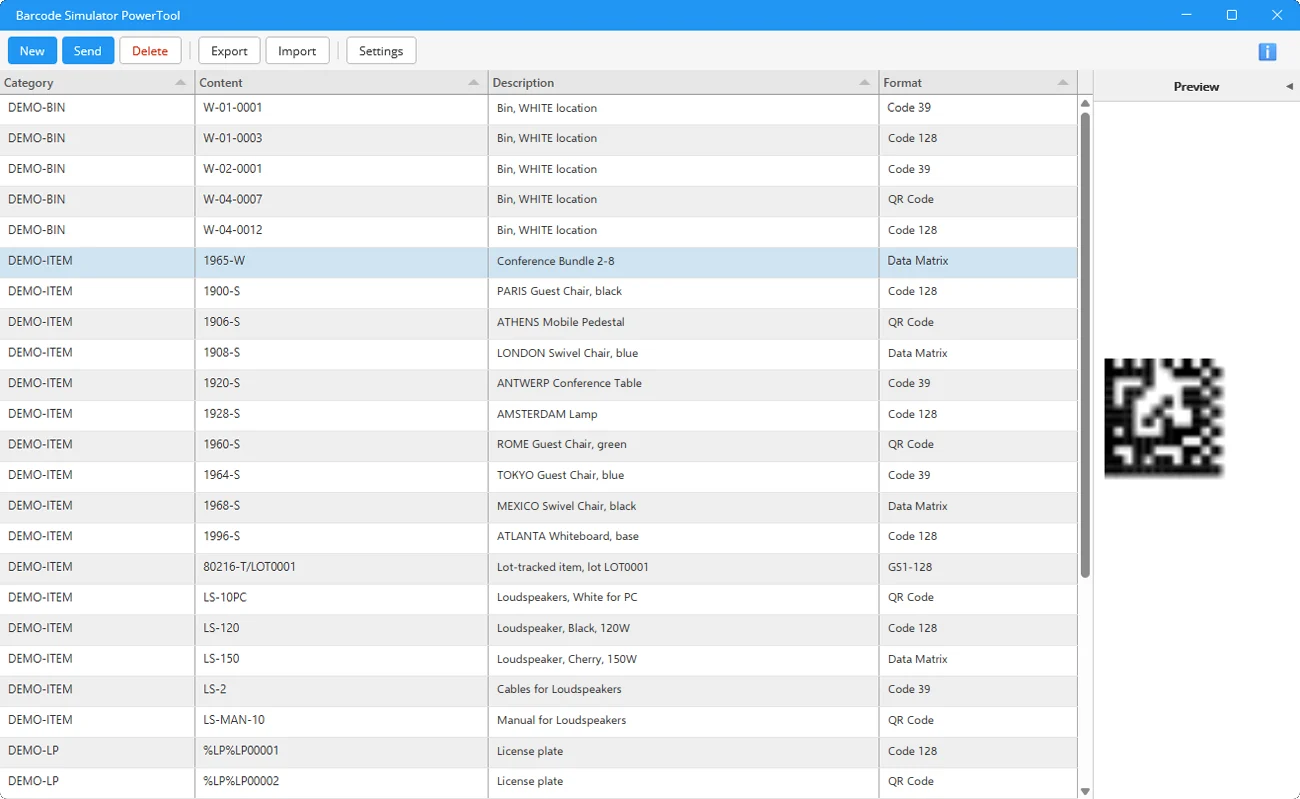
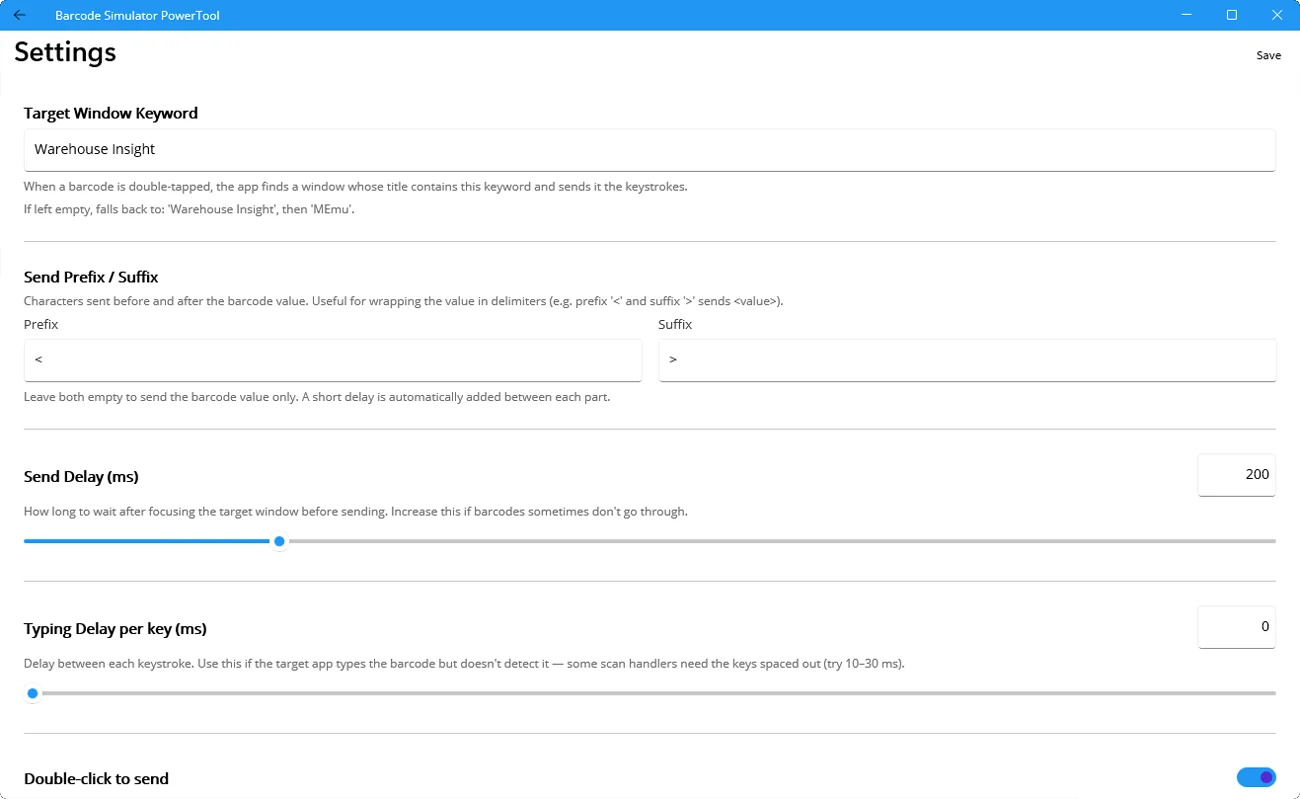
Real screens from Barcode Simulator PowerTool, shown with demo data.
Barcode Simulator PowerTool features
- Barcode listKeep your test barcodes in one list with Category, Content, Description and Format columns, sortable by any column.
- One-click sendDouble-click a row, or select it and choose Send, to send the barcode to the target app as a scan.
- Barcode previewSee the selected barcode in the preview pane before you send it.
- Export and importExport test barcodes to a CSV file and import them on another computer, so a team uses the same scans.
- Target window keywordSend scans to any Windows app, chosen by a keyword in its window title.
- Prefix and suffixSend characters before and after the barcode value, so the scan matches what the target app expects.
- Send and typing delaysWait a set time after the window is focused, and add an optional delay between keystrokes.
- Local data folderTest barcodes and settings are stored on the computer, with a button to open the data folder.
Requirements and licensing
Free Windows app
Barcode Simulator PowerTool is free. Install it on a Windows computer from the Microsoft Store.
Licenses for the apps you test
The apps it sends scans to are licensed separately. For Warehouse Insight, each computer running Warehouse Insight Desktop Client counts as a Warehouse Insight user.
Target app on the same computer
Any Windows app can receive the scans, but it must be open on the same computer.
No Business Central license for the app
Barcode Simulator PowerTool is not a Business Central extension, so the app itself needs no Business Central license.
Records must already exist
The app types keystrokes into the target window. It does not connect to any system or create records, so the bins, items and other records you scan must already exist in the app you test.
Built for testing, training and demos
Use it for testing, training and demos, not for daily production scanning. It does not test scanner hardware, scanner setup, label print quality or Wi-Fi coverage, so run final checks on the real device.
PRICE
Free
A free Windows app from the Microsoft Store. The apps it sends scans to are licensed separately.
App details and prerequisites
- Platform
- Windows
- Installed from
- Microsoft Store
- Insight Works license
- Free
- Business Central license
- None for the app itself (not a Business Central extension)
- Works with
- Any Windows app open on the same computer. For Insight Works apps: Warehouse Insight, Shop Floor Insight and Dynamic Ship
- Tested with
- Warehouse Insight Desktop Client on the same Windows computer, connected to Business Central online
Questions about Barcode Simulator PowerTool?
Ready to plan a rollout? Contact your Microsoft Partner. For product questions, send us a note and the Barcode Simulator PowerTool team will reply by email.
Ask a product question
Works alongside Barcode Simulator PowerTool
 Warehouse InsightMobile barcode scanning and warehouse management for Business Central.
 Shop Floor InsightCapture labor and machine time, consumption, output, and scrap on barcode and touchscreen terminals
 Dynamic ShipCompare live carrier rates, build packages, print labels, and track shipments inside Business Central
 Barcode Generator PowerToolAdd 1D and 2D barcodes to Business Central reports, with sample reports and developer functions